Configuration
All configuration is environment-driven. Copy .env.example to .env and set what you need. The most important values are the LLM endpoint (see Bring Your Own Endpoint).
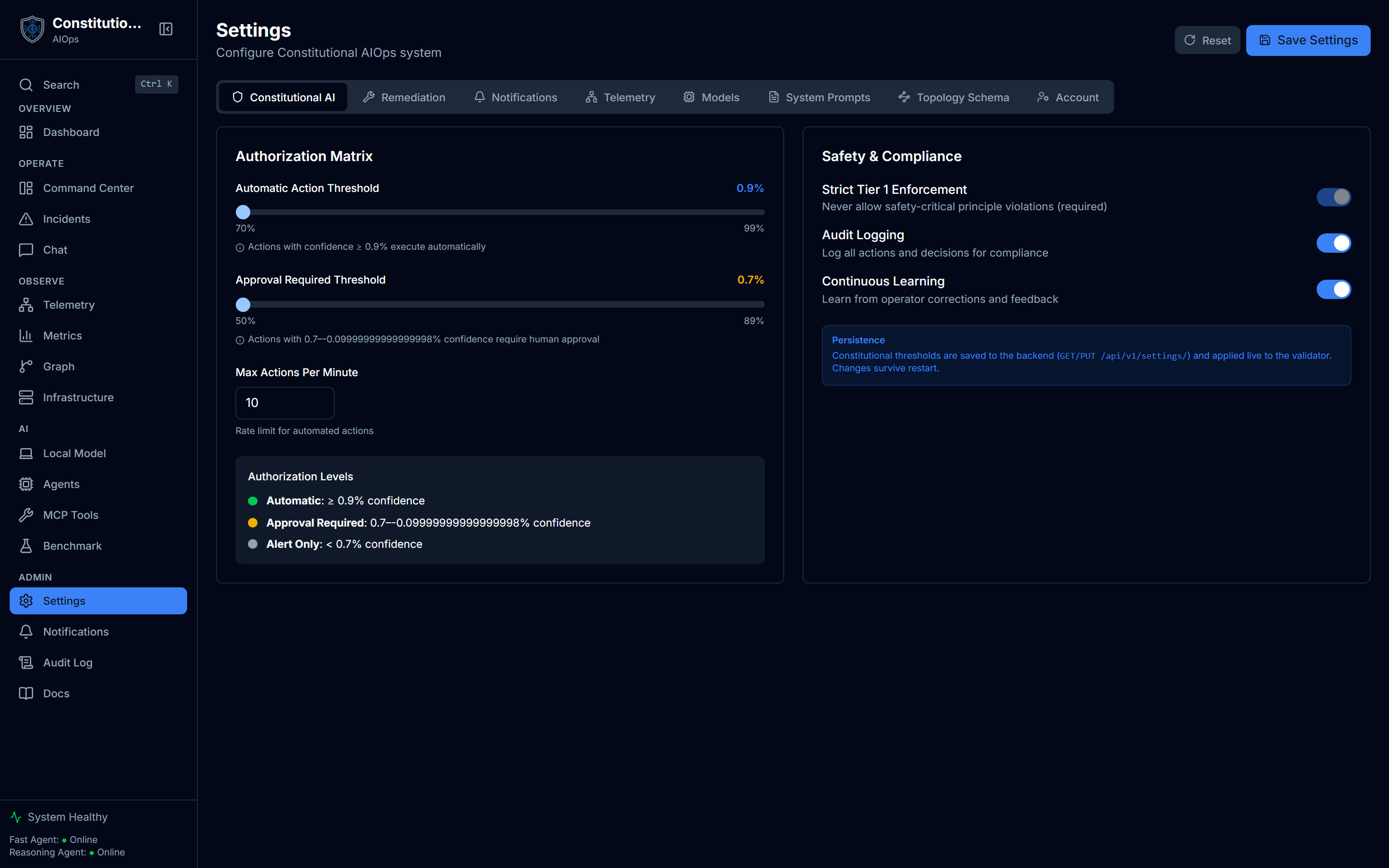
Most of the values below are also editable live in the running app under Settings. This page is the environment-variable source of truth used at boot. Settings is the day-to-day way to change the same values afterward, usually with no restart needed. The screenshot above shows the Constitutional AI tab, where CONFIDENCE_THRESHOLD_AUTO and CONFIDENCE_THRESHOLD_APPROVAL below become the Automatic Action Threshold and Approval Required Threshold sliders.
Environment reference
| Variable | Default | Description |
|---|---|---|
FAST_AGENT_URL | http://localhost:8000/v1 | Fast-agent OpenAI-compatible base |
REASONING_AGENT_URL | http://localhost:8001/v1 | Reasoning-agent base (may equal the fast URL) |
FAST_AGENT_MODEL | qwen3-4b | Fast-agent model name |
REASONING_AGENT_MODEL | qwen3-14b | Reasoning-agent model name |
LLM_API_KEY | unset | Shared bearer token for a secured endpoint. Empty means no Authorization header |
FAST_AGENT_API_KEY | falls back to LLM_API_KEY | Per-agent bearer override for the fast endpoint |
REASONING_AGENT_API_KEY | falls back to LLM_API_KEY | Per-agent bearer override for the reasoning endpoint |
AUTH_REQUIRED | false | Gate the app behind the built-in session login |
WS_TOKEN | unset | Required when ENVIRONMENT=production. Guards the /ws websocket when AUTH_REQUIRED=false. With auth on, the session cookie is the gate and this value is neither issued nor accepted |
APP_DOMAIN | unset | Domain for the Caddy edge profile |
ACME_EMAIL | admin@example.com | Let's Encrypt contact for the edge profile |
PUBLIC_API_URL | http://localhost:8000/api/v1 | SPA build-time API base. Set to /api/v1 for same-origin edge |
AIOPS_GRAPH_BACKEND | neo4j | Episode-graph store: neo4j, embedded, or memory. See Graph memory backend |
NEO4J_URI | bolt://localhost:7687 | Neo4j URI. Used only when the backend is neo4j |
NEO4J_PASSWORD | required with Neo4j | Neo4j password. Used only when the backend is neo4j |
AIOPS_DATA_DIR | ./data | Where persistent state lives, including the embedded graph file. A mounted volume on the lite tier |
CONFIDENCE_THRESHOLD_AUTO | 0.90 | Auto-approve threshold |
CONFIDENCE_THRESHOLD_APPROVAL | 0.70 | Require-approval threshold |
Graph memory backend
The episodic memory behind Graph Explorer has a pluggable backend, chosen by AIOPS_GRAPH_BACKEND.
| Value | Storage | Survives a restart | When to use |
|---|---|---|---|
neo4j | Neo4j server | Yes | The default, and the full GPU stack. Full graph queries at the highest fidelity |
embedded | SQLite file under AIOPS_DATA_DIR | Yes | The lite tier default. A persistent graph with no Neo4j server to run |
memory | Process memory | No | Tests and throwaway runs. Empties on restart |
Whichever backend is active, the rest of the product uses the same in-process episode working set and vector similarity search. The embedded backend adds a durable mirror: it writes each episode to episodes.db in AIOPS_DATA_DIR, so a fresh boot reloads incident memory without a Neo4j server. On the lite tier that directory is a mounted volume, so the graph fills up as the app runs and stays put across container restarts. The lite compose file already sets AIOPS_GRAPH_BACKEND=embedded; the full stack leaves it at neo4j, unchanged.
Configuration and the UI
Most rows in the table above have a live counterpart in Settings: thresholds, remediation mode, notification channels, and the LLM endpoint itself are all editable there, and most changes apply without a restart.
One thing has no environment variable at all: the per-user AI-widgets opt-in. The Dashboard ships with computed widgets (Blast-Radius Preview, Anomaly Scan, and others) that read your real telemetry in the browser and never call a model. A separate, opt-in layer lets a widget ask an LLM to explain a result it already computed. That layer is cost-fenced and always labelled as model-generated, never shown as measured telemetry. The opt-in toggle lives under Settings, Account, per user, not in .env. See Generative UI for the full explanation of both layers and Settings for where to toggle it.
Authentication
Set AUTH_REQUIRED=true to gate the app behind the built-in session login, then set AUTH_ADMIN_USER, AUTH_ADMIN_PASSWORD, and AUTH_SECRET_KEY. When ENVIRONMENT=production you must also set WS_TOKEN. The admin credentials seed only on an empty users table.
WS_TOKEN guards the websocket when the app runs without login, which is the only gate available in that mode. With AUTH_REQUIRED=true the session cookie rides the upgrade request and is the gate instead: GET /ws/token returns an empty string and the socket refuses a token, so the shared secret never reaches a URL or a proxy access log. The variable is still required at boot in production so that switching auth off does not silently leave the socket open.
Who can do what
Signing in is not the same as being allowed to act. Beyond the confidence thresholds in Constitutional Safety, these operations require the admin role rather than merely a signed-in session:
| Operation | Endpoint | Role |
|---|---|---|
| Approve an action | POST /actions/{id}/approve | admin |
| Execute an approved action | POST /actions/{id}/execute | admin |
| Remediate an incident | POST /incidents/{id}/remediate | admin |
| Delete an incident | DELETE /incidents/{id} | admin |
| Dismiss an incident | POST /incidents/{id}/dismiss | admin |
| Update an incident (triage notes, assignee) | PATCH /incidents/{id} | any signed-in user |
Triage stays open to any signed-in user on purpose, because notes and assignment are what a non-admin operator legitimately changes. Anything that runs a command against your infrastructure does not.
The approver recorded in the audit trail comes from the authenticated session. An approved_by field in the request body is accepted for backwards compatibility and ignored.
What you can see
Roles decide what you may do. Ownership decides what you may see.
Actions and incidents are scoped per account. You see the actions you created and the incidents you filed; an admin sees every record, because running the system requires it. Anything raised by the telemetry pipeline has no human owner and is visible to admins only, so a self-service account cannot read the operator's infrastructure incidents.
| Endpoint | What a non-admin sees |
|---|---|
GET /actions and GET /actions/stats | only actions they created |
GET /actions/pending | only their own awaiting-approval actions |
GET /actions/{id} and POST /actions/{id}/cancel | their own, otherwise 404 |
GET /incidents and GET /incidents/stats | only incidents they filed |
GET /incidents/{id}, PATCH, analyze, similar | their own, otherwise 404 |
A record that belongs to someone else answers 404, not 403. A 403 would confirm the id exists, which turns the endpoint into a way to enumerate other accounts' records one request at a time.
Chat conversations follow a stricter rule and are unchanged: they are private to their author, and an admin does not get to read them.
Rate limits
The endpoints that cost money or change infrastructure carry a per-caller sliding window. Going over one returns 429 with a Retry-After header.
| Variable | Default | Covers |
|---|---|---|
AIOPS_RATE_CHAT_PER_HOUR | 120 | POST /chat and POST /chat/stream |
AIOPS_RATE_TOOLS_PER_HOUR | 120 | POST /tools/call |
AIOPS_RATE_ACTIONS_PER_HOUR | 60 | action approve and execute, and incident remediate |
TRUSTED_PROXY_HOPS | 1 | How many reverse proxies sit in front of the app |
In a Docker deploy, set them in .env next to the compose file. The lite compose file forwards all four to the backend; .env.example lists them commented out at their defaults.
Chat matters most on a hosted instance, because an OpenAI-compatible endpoint is billed per token and a runaway loop against an unbounded /chat is the cheapest way to produce a surprising bill.
The window is keyed on the signed-in user where there is one, and on the client address otherwise, so one noisy session cannot throttle everyone sharing an outbound address. It is in-process, so it is per worker and it resets on restart. Treat it as a floor that bounds a runaway loop and a single abusive session, not as a distributed rate limiter.
TRUSTED_PROXY_HOPS decides how X-Forwarded-For is read. A client can put anything at the front of that header, so the genuine peer is the value your own proxy appended at the right, and the header is parsed from the right by this many hops. The default of 1 is correct for the bundled Caddy edge profile. Set it to exactly the number of proxies you run. Too high and the parser reaches into the part the client wrote, so a caller can rotate its own throttle key. Too low and every caller behind a proxy shares that proxy's address as one key.
A CDN in front of the bundled Caddy is one more hop, so set 2. Caddy also has to trust the CDN: pass its origin-facing IP ranges, space separated, in CF_ORIGIN_RANGES. Caddy keeps an incoming X-Forwarded-For only from a peer it trusts, so without those ranges it drops the CDN's header and every visitor looks like the CDN. If the CDN reaches the box on a second hostname, name it in ORIGIN_DOMAIN so Caddy obtains a certificate for it too.
Telemetry ingestion (/ingest/*)
The limits above are enforced by the application, so they only cover requests that reach it. The full observability stack also exposes /ingest/loki, /ingest/prom and /ingest/otlp at the edge, and those proxy straight to Loki, Prometheus and Tempo without touching the backend. They are guarded by a separate machine credential and a 10MB body cap, but a caller holding that credential could still push at any rate it liked.
Stock Caddy has no rate-limiting directive, so this is opt-in and needs the custom image in docker/Dockerfile.caddy, which is the pinned Caddy release plus caddy-ratelimit. Apply the overlay last so its keys win:
docker compose -f docker-compose.yml -f docker/docker-compose.production.yml -f docker/docker-compose.ingest-ratelimit.yml up -d --build caddy| Variable | Default | Covers |
|---|---|---|
INGEST_RATE_EVENTS | 600 | Requests allowed per source address per window |
INGEST_RATE_WINDOW | 1m | Length of the sliding window |
The default is 10 requests per second per source, generous for a handful of agents and still a real ceiling on a runaway pusher. Going over returns 429 with a Retry-After header.
Two details worth knowing. The limit keys on the TCP peer, not on X-Forwarded-For, so a caller cannot raise its own ceiling by forging a header. And it runs before the credential check, so a flood is rejected without spending a password comparison on every request.
Leaving the overlay out gives you exactly the previous behaviour. It does not edit the compose files it layers onto.
Action tools (remediation)
Restart and scale remediation is off by default and fail-closed. Turn it on only when you understand the blast radius.
| Variable | Default | Description |
|---|---|---|
AIOPS_ENABLE_ACTION_TOOLS | false | Master kill-switch for restart and scale |
AIOPS_ACTION_CONTAINER_WHITELIST | empty | Extra containers beyond the default whitelist |
Even with tools enabled, actions pass the constitutional gate and the authorization matrix before anything runs. See Constitutional Safety. MCP tools lists these same two tools and shows the gate they pass through, live.
Public self-service signup (hosted demo only)
Off by default. A self-host deployment keeps user creation admin-only. Turn this on only on a hosted demo instance. The abuse controls (captcha, email verification) are all optional. With none set, signup still enforces the password policy and a per-IP rate limit.
| Variable | Default | Description |
|---|---|---|
AIOPS_ENABLE_PUBLIC_SIGNUP | false | Master flag. When true, the signup route creates role=user accounts. Leave false for self-host |
SIGNUP_CAPTCHA_PROVIDER | unset | turnstile or hcaptcha. Unset disables captcha |
SIGNUP_CAPTCHA_SITE_KEY | unset | Public site key rendered by the SPA widget |
SIGNUP_CAPTCHA_SECRET | unset | Server secret for siteverify. If a provider is set but this is empty, signup fails closed |
SIGNUP_SMTP_HOST / SIGNUP_SMTP_PORT | unset / 587 | SMTP relay for the verification email. Unset means the link is logged, not mailed |
SIGNUP_EMAIL_FROM | no-reply@localhost | From address on the verification email |
PUBLIC_BASE_URL | unset | Base URL used to build the verification link |