Overview
Constitutional AIOps is an autonomous infrastructure management system. It combines a dual-agent LLM pipeline, a constitutional safety framework, and an optional graph-episodic memory, with human approval for anything uncertain.
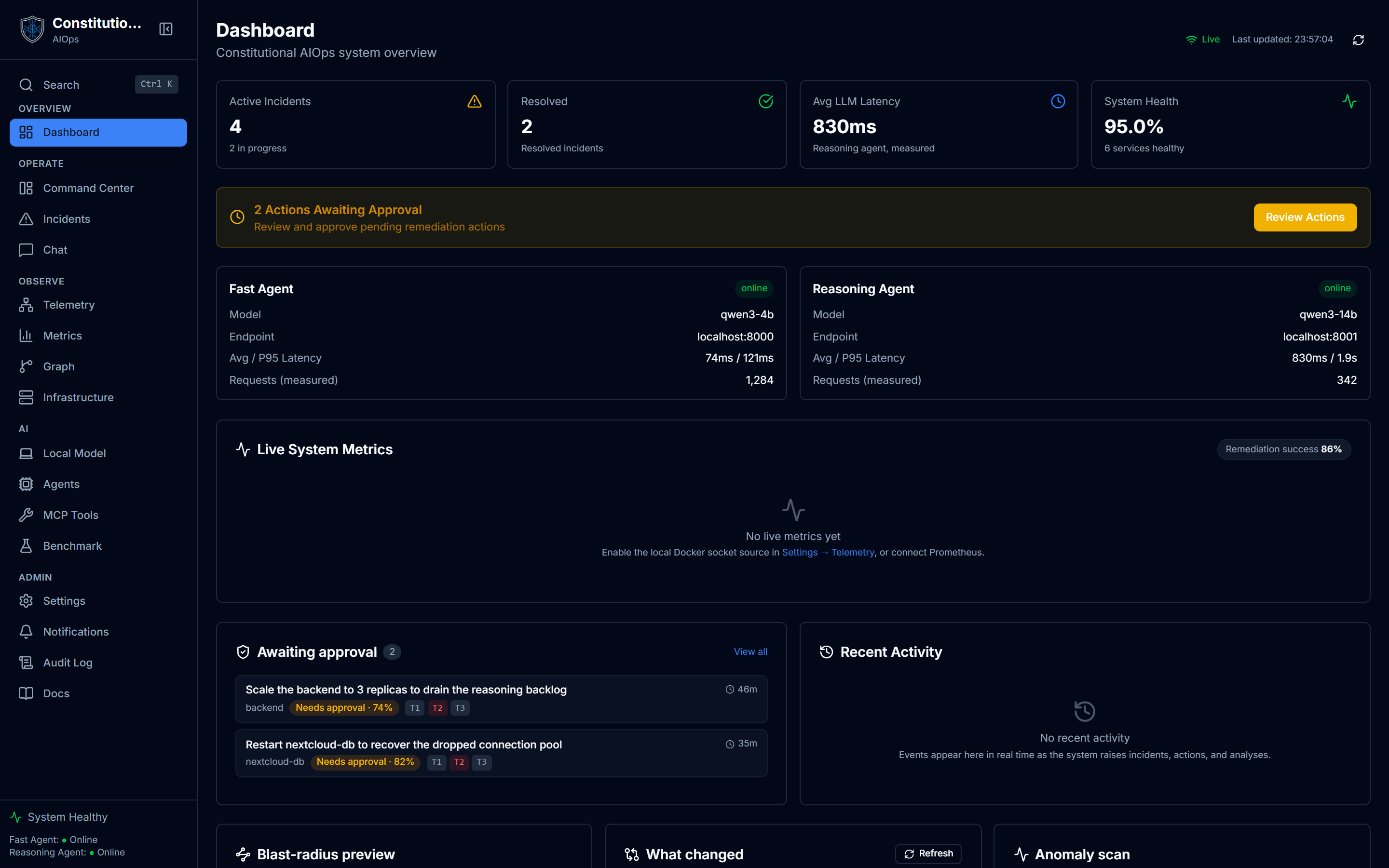
This is the Dashboard, the first screen you land on after signing in: live service status, agent latency, and a set of event-driven widgets.
See every screen first
Features and tutorials is a screenshot walkthrough of every screen in the app. Start with Dashboard and Generative UI, then come back here to set things up.
The pieces
- Dual-agent pipeline. A fast agent annotates and classifies telemetry. A reasoning agent handles root cause analysis, remediation planning, and chat. Both talk to any OpenAI-compatible endpoint, and may share one.
- Constitutional safety. Twelve principles across three tiers score every proposed action. See Constitutional Safety.
- Graph-episodic memory. Optional Neo4j memory correlates incidents. The lite profile drops the Neo4j container and defaults to
AIOPS_GRAPH_BACKEND=embedded, a persistent SQLite store that survives restarts. A purely ephemeral store is available asAIOPS_GRAPH_BACKEND=memoryand is intended for tests. - Human-in-the-loop. Actions never execute inside the model loop. They queue for an approve or reject decision unless they are both auto-eligible and high-confidence.
Quick start (lite)
The fastest path is the lite profile: backend, frontend, and your own OpenAI-compatible LLM endpoint. No GPU, no bundled models, no Neo4j.
# 1. Clone
git clone https://github.com/Partha-dev01/Constitutional-AIOps.git constitutional-aiops
cd constitutional-aiops

# 2. Configure your LLM endpoint
cp .env.example .env
#   set FAST_AGENT_URL / REASONING_AGENT_URL / *_MODEL (both agents may point at
#   the same endpoint and model), plus LLM_API_KEY if the endpoint needs a token.

# 3. Start (self-contained)
docker compose -f docker/docker-compose.lite.yml --env-file .env up -d

# 4. Open the app
#   Frontend  http://localhost:3000
#   Backend   http://localhost:8000/docs
--env-file .env is required
Docker Compose reads its interpolation .env from the compose file's own directory (docker/), not the repo root. Without --env-file .env your endpoint comes through blank and the backend refuses to boot. With make installed, make lite-up runs the same command.
That is the whole thing. The app degrades gracefully without Neo4j and the observability stack, so this is a genuine one-command self-host and not a crippled build.
Prerequisites
| Requirement | Version | Notes |
|---|---|---|
| Docker | 24+ | With Docker Compose v2. Install both via https://get.docker.com |
| RAM | 2 GB+ | Measured steady-state is about 0.74 GiB |
| Disk | 20 GB | The CPU-only image is about 1.3 GB |
| LLM endpoint | any OpenAI-compatible | vLLM, Ollama, AWS Bedrock, OpenAI, and others |
Where to next
- Self-Hosting for every deployment option, TLS at the edge, and troubleshooting.
- Bring Your Own Endpoint for wiring your LLM.
- Configuration for the full environment reference.
- Architecture and Constitutional Safety for how it works.