Self-Hosting
The lite profile is the recommended self-host. This page covers every option, TLS at the edge, and troubleshooting.
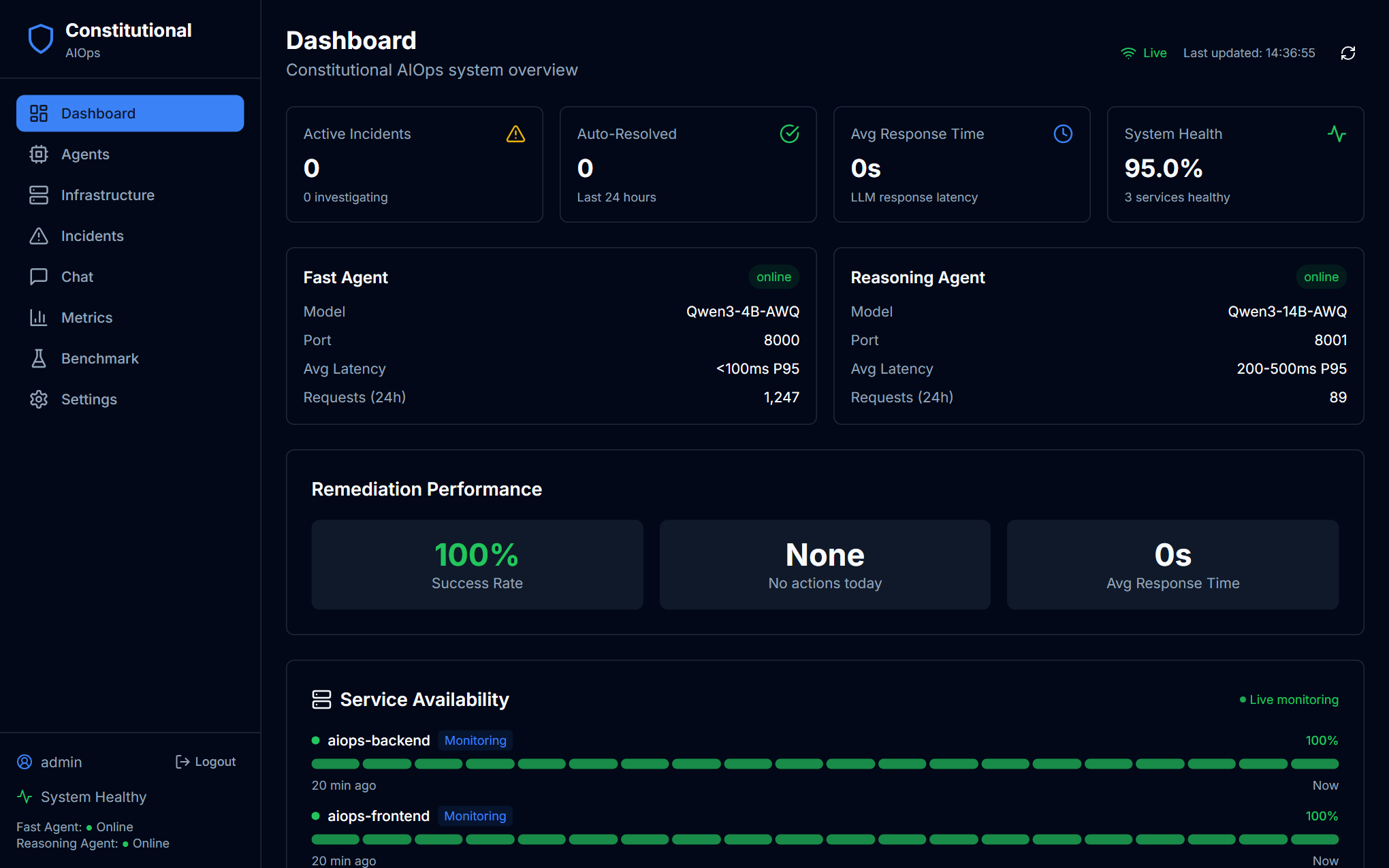
That is what a running self-host looks like: both agents point at local ports (8000 and 8001 in the full GPU stack below) instead of a remote endpoint. For a screenshot walkthrough of every screen once it is up, see Features and tutorials, especially Infrastructure for the containers these compose files bring up.
Deployment options
| Option | LLM | GPU | Compose file | Best for |
|---|---|---|---|---|
| Lite self-host | Bring your own endpoint | No | docker/docker-compose.lite.yml | Recommended. Cheap, portable, one command |
| Full GPU stack | Local vLLM dual-engine | Yes (24 GB) | docker-compose.yml + docker/docker-compose.{gpu,production}.yml | The research-paper reference configuration |
| Local development | Mock server | No | docker-compose.yml + docker/docker-compose.local.yml | UI and API work without any LLM |
The lite tier is what runs the hosted deployment: a small 2 GiB instance with the LLM offloaded to a remote endpoint, fronted by Caddy with Let's Encrypt TLS.
Lite self-host
The lite profile (docker/docker-compose.lite.yml) is self-contained. Use it alone, not layered on docker-compose.yml.
Localhost (no TLS)
docker compose -f docker/docker-compose.lite.yml --env-file .env up -d
# frontend  http://localhost:3000
# backend   http://localhost:8000
The SPA calls the backend cross-origin at :8000, so CORS_ORIGINS defaults to http://localhost:3000, already set for you.
Public edge (Caddy + Let's Encrypt TLS)
Enable the edge profile to put Caddy in front on a real domain. The frontend and backend stay internal, and only Caddy binds 80 and 443.
# .env must set APP_DOMAIN + ACME_EMAIL, and PUBLIC_API_URL=/api/v1 so the SPA
# bundle is same-origin under the domain.
APP_DOMAIN=aiops.example.com
ACME_EMAIL=you@example.com
PUBLIC_API_URL=/api/v1

docker compose -f docker/docker-compose.lite.yml --env-file .env --profile edge up -d
What lite includes and drops
| Component | Lite | Behaviour |
|---|---|---|
| Backend (FastAPI) | Yes | CPU-only image (about 1.3 GB). Embeddings and BERTScore run on CPU |
| Frontend (React/nginx) | Yes | Static SPA |
| Caddy edge (TLS) | optional (--profile edge) | Let's Encrypt on APP_DOMAIN |
| Neo4j server | No | Not run on lite |
| Graph memory | Yes, persistent | Embedded SQLite episode store (AIOPS_GRAPH_BACKEND=embedded), survives restarts |
| LGTM observability | No | Metrics page shows fallback data |
| Local GPU and models | No | Bring your own endpoint |
Where lite keeps its data
Lite runs the graph without Neo4j by defaulting AIOPS_GRAPH_BACKEND=embedded, which stores episodes in a SQLite file at AIOPS_DATA_DIR (a named volume in the compose file). Incident memory therefore survives a container restart or rebuild, and Graph Explorer fills up as the app runs. See Configuration for the backend options. To wipe it, remove the volume (see Reset below).
Container health on the Dashboard
The lite backend mounts the host Docker socket (/var/run/docker.sock) read-only so the Dashboard and Infrastructure pages show the real running containers and their health. This does not enable restart or scale remediation, which is a separate opt-in (AIOPS_ENABLE_ACTION_TOOLS=true, off by default). A container with the host socket can control the daemon, so keep the box locked down.
Full GPU stack (reference config)
The research-paper configuration runs both models locally on one 24 GB GPU with vLLM AWQ-marlin: Qwen3-4B (fast, port 8000) and Qwen3-14B (reasoning, port 8001), always loaded, plus Neo4j and the full LGTM observability stack.
# On a GPU host with the NVIDIA container toolkit:
git clone https://github.com/Partha-dev01/Constitutional-AIOps.git constitutional-aiops
cd constitutional-aiops
cp .env.production.example .env   # set NEO4J_PASSWORD, AUTH_*, WS_TOKEN, ...
docker compose -f docker-compose.yml -f docker/docker-compose.gpu.yml up -d
This is heavier (about 8.8 GB of memory limits across Neo4j, LGTM, and the services) and is not required to run the product. The lite tier is the recommended self-host.
Local development
# No-GPU mock LLM
docker compose -f docker-compose.yml -f docker/docker-compose.local.yml up -d

# Hot-reload
cd src && uvicorn main:app --reload --port 8000   # backend
cd frontend && npm run dev                        # frontend (new terminal)
Service ports (lite)
| Port | Service |
|---|---|
| 3000 | Frontend (nginx) |
| 8000 | Backend API |
| 80 / 443 | Caddy edge (--profile edge only) |
The full GPU stack adds Neo4j (7474/7687), Grafana (3001), Loki (3100), Tempo (3200), Prometheus (9090), and the OTEL collector (4317/4318).
Troubleshooting
Agents show offline or LLM errors
# Verify your endpoint answers an OpenAI-compatible request:
curl -s "$FAST_AGENT_URL/models" -H "Authorization: Bearer $LLM_API_KEY"
# Then check the backend's view:
curl http://localhost:8000/api/v1/health | jq
Check FAST_AGENT_URL, REASONING_AGENT_URL, and *_MODEL in .env, and that LLM_API_KEY is set if the endpoint needs auth. You can also fix all of these live from Settings, Models.
Dashboard Service Availability is empty
The lite backend needs the Docker socket mounted, which it is in docker-compose.lite.yml. Confirm the daemon is reachable:
docker exec aiops-backend python -c "import docker; print([c.name for c in docker.from_env().containers.list()])"Reset
docker compose -f docker/docker-compose.lite.yml down -v   # removes volumes too
docker compose -f docker/docker-compose.lite.yml --env-file .env up -d
down -v removes the state volume, so this also clears the embedded graph (AIOPS_DATA_DIR). Drop -v to keep incident memory across the restart.